
Why Is My Pool Chlorinator Saying “No Flow”?
You walk past your pool equipment, glance at the chlorinator and see those two words no pool owner wants to see:
NO FLOW.
So, what does it actually mean?
A “No Flow” fault usually means your chlorinator isn't detecting enough water moving through the system to safely operate the chlorinator cell.
The good news? It doesn't automatically mean your chlorinator is broken. There are several things that can cause a No Flow warning — and some are surprisingly simple.
1. Your Pool Water Level Is Too Low
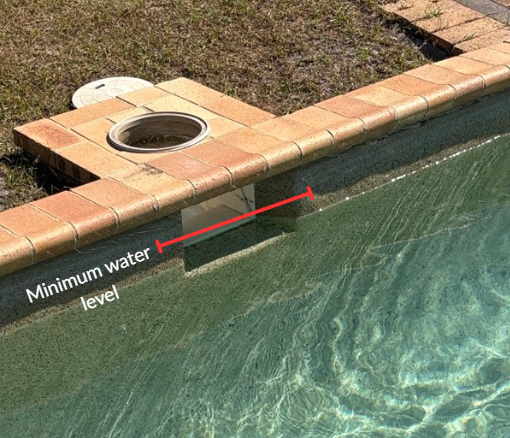
Start with one of the easiest things to check: your pool water level.
If the water drops too low, the skimmer can begin drawing air instead of a consistent supply of water. This can reduce circulation and trigger a No Flow warning.
As a general guide, your water level should sit around halfway up the skimmer opening.
2. Your Skimmer or Pump Basket Is Full
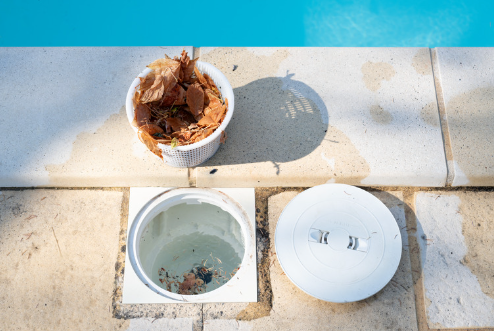
Leaves, insects and other debris can quickly build up inside your skimmer and pump baskets.
When they become too full, they restrict the amount of water reaching the pump.
Less water in = less water out.
If the restriction is significant enough, your chlorinator may no longer detect sufficient flow.
Tip: Check your baskets regularly, particularly after storms or windy weather.
3. Your Filter Is Dirty
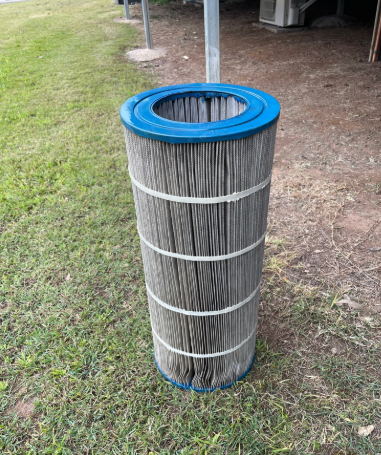
A dirty or blocked filter can significantly restrict water circulation.
Depending on your filter type, it may be time to backwash your sand or media filter or give your cartridge filter a thorough clean.
If you've noticed weaker flow from your pool returns at the same time as the No Flow warning appeared, the filter is definitely worth checking.
4. There's Air Getting Into the System
Have a look through the clear lid on your pool pump.
A small air bubble can be normal on some systems, but excessive air or a pump that won't completely prime can indicate an air leak.
Possible causes include:
A loose pump lid
A damaged or dry pump lid O-ring
A leaking union
Low pool water level
A blocked skimmer
A suction-side plumbing issue
Air entering the system can interfere with circulation and potentially cause a No Flow fault.
5. Your Pump Isn't Running Fast Enough
If you have a variable-speed pool pump, the RPM may simply be set too low.
Running your pump at a lower speed can be great for reducing energy consumption, but your chlorinator still requires a minimum amount of water flow to operate correctly.
If the pump speed is below that threshold, the chlorinator may display a No Flow warning even though the pump is technically running.
6. Check Your Valves
It's surprisingly easy for a valve to be left partially or completely closed after maintenance.
Incorrect valve positioning can restrict water travelling through the filtration system.
If the No Flow warning appeared after someone worked around the equipment, checking the valve positions is a good place to start.
7. Your Chlorinator Cell May Need Attention
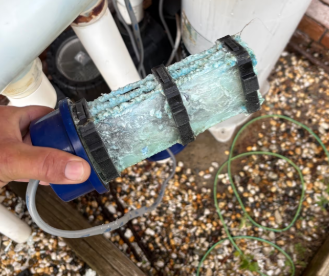
Over time, calcium and mineral deposits can build up on a chlorinator cell.
Heavy build-up can affect the cell's operation and, depending on the system, may contribute to flow detection issues.
Regularly inspecting your cell can help identify build-up before it becomes a bigger problem.
Always follow the manufacturer's instructions when inspecting or cleaning your chlorinator cell.
8. The Flow Sensor Could Be the Problem
What if everything appears normal?
Your pump is running, the baskets are clean, the filter is clear and there's plenty of water coming from the pool returns — but the chlorinator still says No Flow.
At this point, the problem may be with the flow switch or flow sensor itself.
Depending on the chlorinator, the sensor may be dirty, stuck, incorrectly positioned, disconnected or faulty.
This is generally when it's worth having the system properly diagnosed rather than continuing to reset the chlorinator.
Don't Ignore a No Flow Warning
Your chlorinator needs adequate water flow to operate correctly.
If you're seeing a No Flow warning, don't simply keep resetting the system and hoping it disappears. Start with the basics:
Check the water level → empty the baskets → check the filter → look for air → check the pump and valves.
If you've worked through the obvious causes and the warning keeps returning, there may be a circulation, equipment or flow-sensor issue that needs further investigation.